
티스토리 뷰
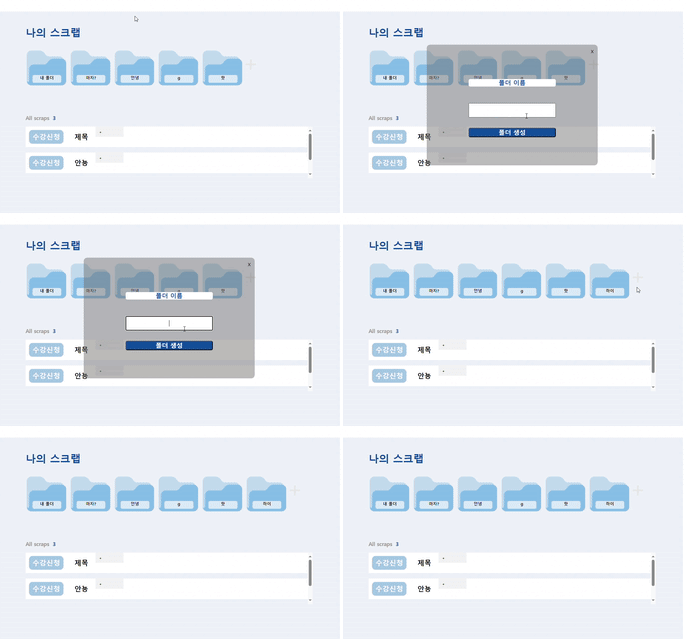
+ 버튼 클릭 시 모달창 생성
1. useState 생성
const [isOpenModal, setOpenModal] = useState<boolean>(false);
useState를 사용해 초기값을 false로 설정
2. + 버튼 클릭 시 함수 호출
<Plus src={PlusImg} onClick={handleMakeFolder} />
+ 버튼 클릭 시 onClick함수를 통해 handleMakeFolder 함수를 호출
3. handleMakeFolder 함수
const handleMakeFolder =  () => {
        setOpenModal(true);
    };
모달창을 보여주기 위해 setOpenModal을 통해 isOpenModal을 true로 설정
4. cloeModal 함수
const closeModal = () => {
        setOpenModal(false);
    };
모달창을 닫는 함수 추가
5번의 MakeModal 컴포넌트에 props로 전달 (밑 내용 참고)
5. 모달창 생성
{isOpenModal && <MakeModal closeModal={closeModal} onChange={handleFolderCreate}/>}
isOpenModal이 true 이므로 MakeModal 컴포넌트를 통해 모달창 생성
6. 모달창 세부내용
import styled from 'styled-components';
<ModalWrapper>
    <Modal>
        <ModalFolderName>폴더 이름</ModalFolderName>
        <CloseButton onClick={closeModal}>x</CloseButton>
    </Modal>
</ModalWrapper>

const ModalWrapper = styled.div`
  align-items: center;
  background-color: rgba(112, 112, 112, 0.473);
  display: flex;
  height: 40vh;
  justify-content: center;
  left: 0;
  overflow: hidden;
  position: absolute;
  top: 10%;
  width: 50%;
  z-index: 100;
  margin-left: 25%;
  border-radius: 10px;
`;

const Modal = styled.div`
  margin: 0 auto;
  text-align: center;
  display: flex;
  flex-direction: column;
  gap:30px;
`;

const ModalFolderName = styled.p`
  color:#0E4D9D;
  font-size: 18px;
  font-weight: 600;
  line-height: 22px;
  background-color: white;
  border-radius: 5px;
`

const CloseButton = styled.button`
  background: none;
  padding: 5px 20px;
  font-size: 18px;
  position: absolute;
  top: 0;
  right: 0;
  width: 20px;
  height: 20px;
  position: absolute;
  border: none;
`;
- props통해 넘어온 closeModal을 사용해 CloseButton클릭 시 모달창을 닫도록 설정
- Modal을 div에 감싸고 div를 ModalWrapper로 설정
- ModalWrapper를 position:absolute;로 설정하고 z-index를 설정하여 맨 앞에서 뜰 수 있도록 설정
'react' 카테고리의 다른 글
| (Redux) 리덕스 사용해보기 (0) | 2024.02.14 |
|---|---|
| (React + typescript) 📃FullCalendar 사용 (0) | 2024.01.28 |